Download the Cash Flow Business Plan below, this spreadsheet is used to help founders create a business plan, understand their profitability and comprehend dilution from Investors
An Example of the Cash flow with Input Data, At the Bottom of the Page is a blank version for your use.
User Requirements
The User must have Microsoft Excel for this model to work
As your software vendor, we invite you to authorize us to be your Microsoft indirect reseller. Our business relationship remains in place, and you will get access to a broader selection of products through our organization, and features such as remote user and service management and improved support.
Click the following link to accept this invitation and to authorize Layer 1 Holdings LLC to be your Microsoft indirect reseller.
Note: User with Global Admin permission is required to accept relationship. Customer address must be completed first (https://admin.microsoft.com/Adminportal/Home?#/BillingAccounts/billing-accounts) before using the acceptance link above.
Should you have any questions, please contact us through the email or phone number provided below.
Joe@Layer1Holdings.com 612-806-1958
The Cash Flow Business Plan is built for those needing a Profits and Loss Statements and your scale of business can be managed by an excel spreadsheet and Lower Level of Microsoft Products If you need greater Enterprise resources for your business, select Layer1Holdings LLC to be your Microsoft redistributor so that you can access our products such as DefineTheBox.com, a Layer1Holdings.com/CRM and Microsoft Dynamics Solution
How to use the Model
- Open the file Cash Flow Business Plan
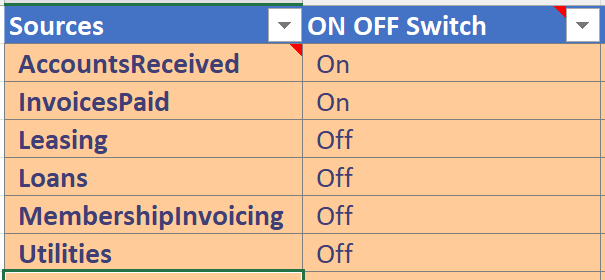
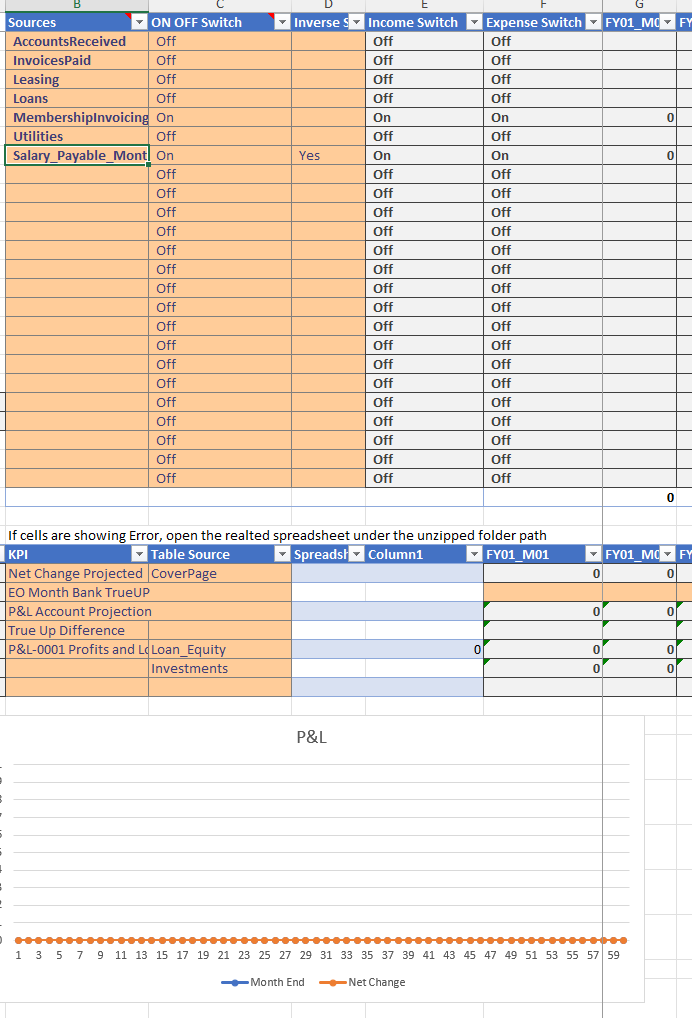
Sources to the Profits and Loss can be turned On and Off on the Tab KPI Calculations and Macros so that the P&L can show various projections
A Blank P&L shows the key assumption Input_FY1_AccountBalance in Cell C10 on the Key Assumption Tab starting with Fiscal Year Start Date in C9
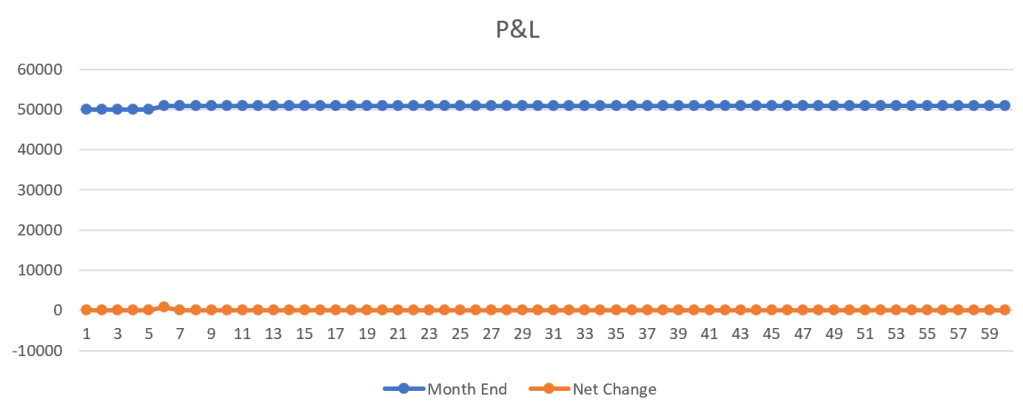
As you turn on income streams like leasing a space causes lease profits
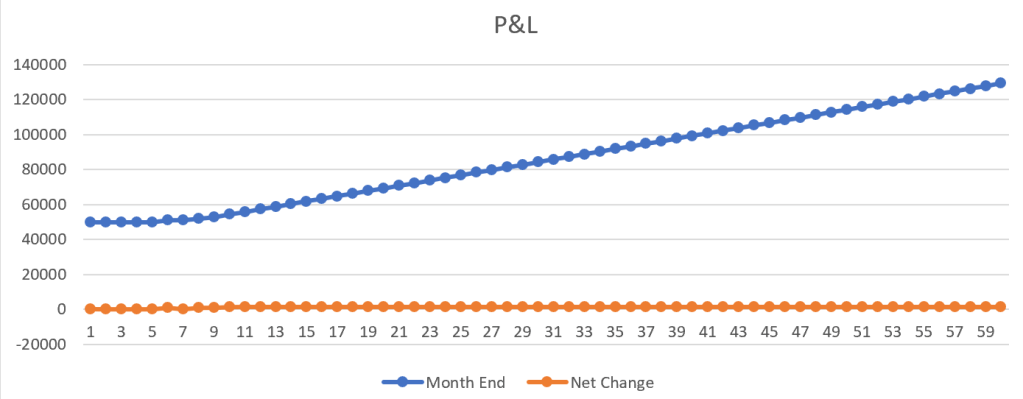
However when you purchase a building to lease there maybe initial down payments, and monthly costs to maintain a building.
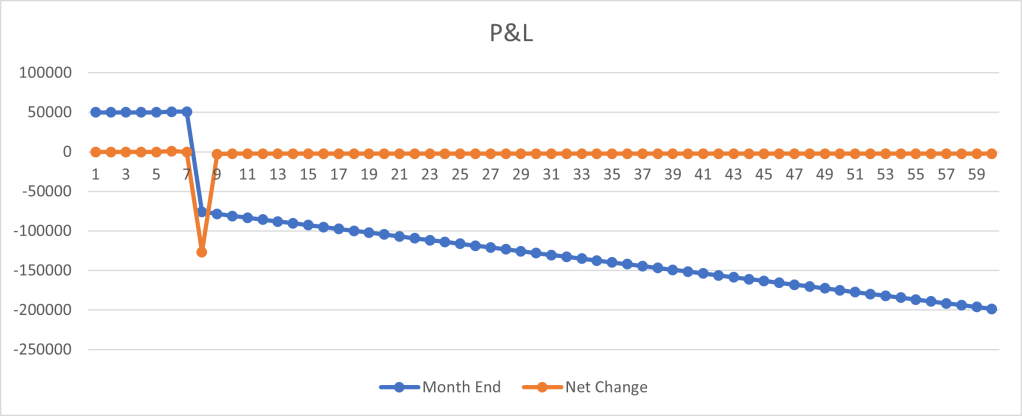
It becomes apparent that the initial costs of purchasing a building has a Gap in the financial plan. In order to maintain Cash Flow Positive. When we further turn on Memberships to access the building that was purchased we can show the cash flow positive and still have a Gap In Financing.
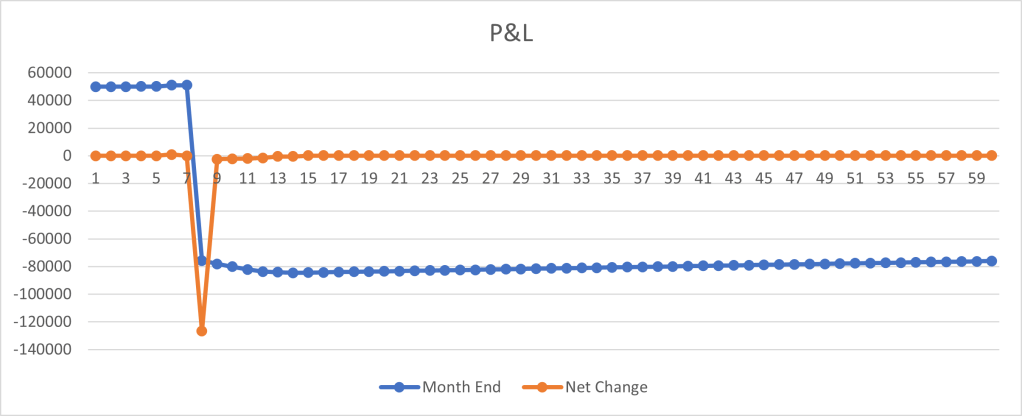
This often leads startup founders to seek investment for their project. Investors will not invest in a project that is not showing traction and requires an investor before traction can start. At this point as a Founder consider an alternative Minimum Viable Product to show greater cash flow before seeking investment.
Under the Investments Tab changing the 45,000 in Cell F41 to 180,000 and the Date of investment to 8/16/24 will show the P&L without a gap in financing, it still shows the spend for down-payment on a Loan as negative cash flow.
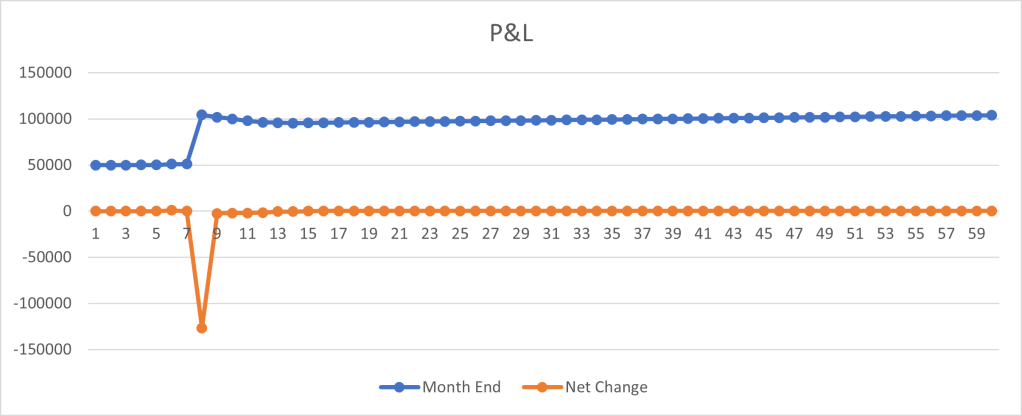
This tool is used to help founders understand their runway for projects.
Hiring an Employee
In this case we added a $1000 Monthly Salary Start Date, 5/1/2025 and an end date of 12/30/2026
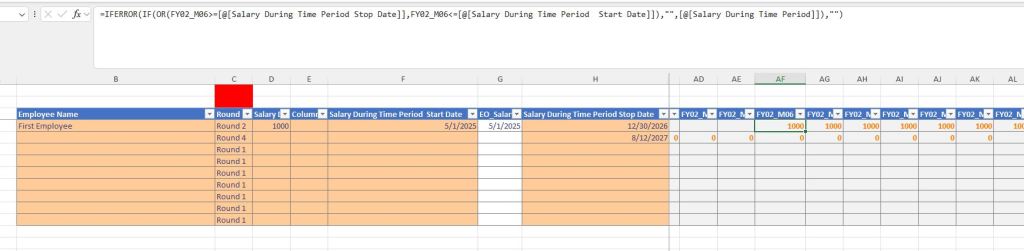
Salary has an impact on the Profits and Loss Statements
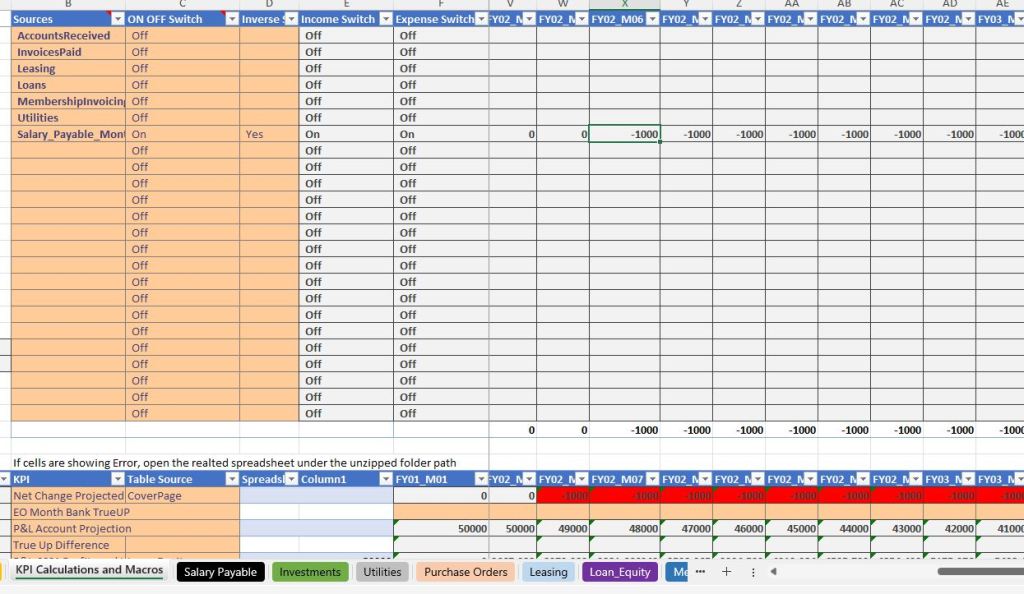
Eventually the Employee needs to contribute to the bottom line, by adding more cash flow, or no longer incurring a cost on operation expenses
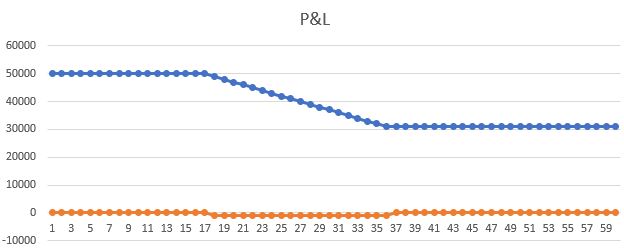
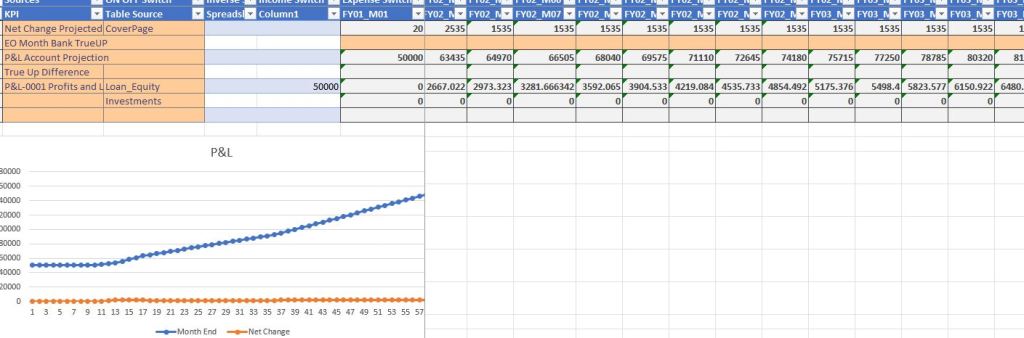
The Point of Hiring is to create more deal flow like memberships
Tabs Most Relevant for Understanding Investment
- Open the Excel file Equity and Investment
- Under the Tab Key Assumption
- Cell C9 this is the Fiscal Year and all Monthly calculations use this
- KPI Calculations and Macros
- This shows an overview of P&L with runway graphs of a table worth of profit and loss accounts
- AccountsReceived, InvoicesPaid, Leasing, Loans, MemberInvoices, Utilities
- This shows an overview of P&L with runway graphs of a table worth of profit and loss accounts
- Under the Tab Key Assumption
- Equity and Investment
- Tab: Investments
- Tables
- Cap_Table
- Calculated_Ownership
- Investors_Once
- Investors_Monthly (can also be used as salary options)
- Equity within this spreadsheet is designed to be a dual entry accounting
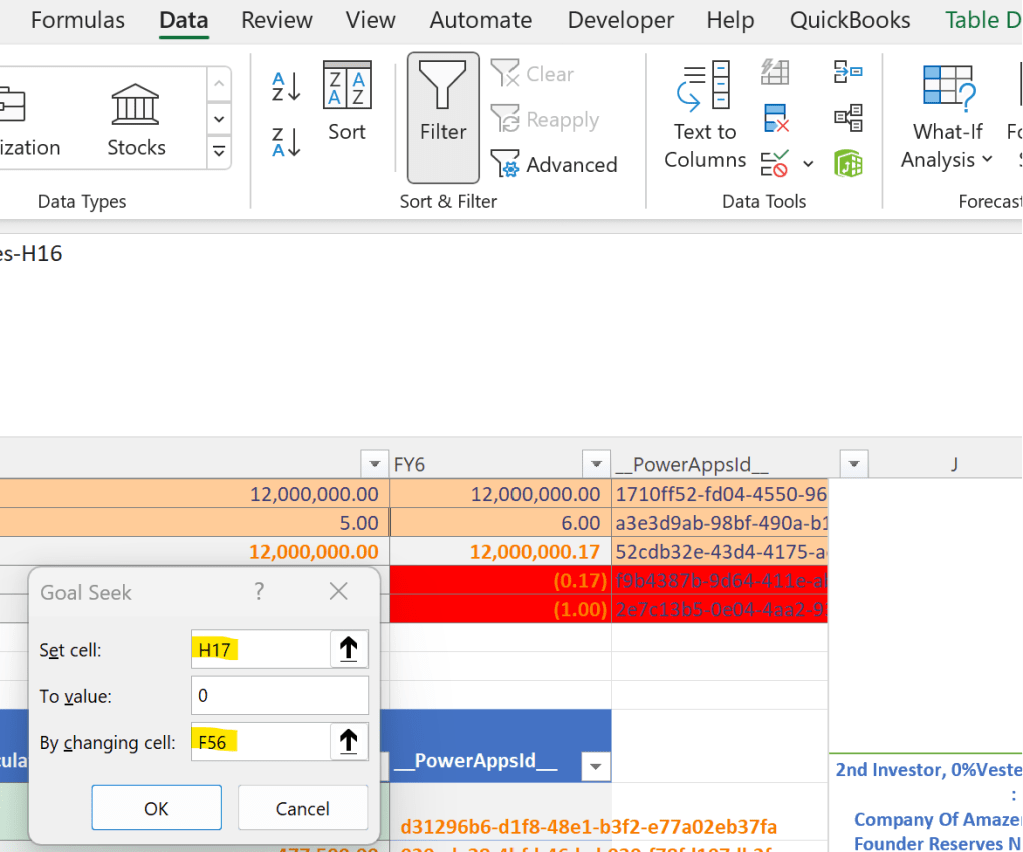
- GOALSEEK is under Data, What If Analysis. If you cannot find Goalseek, it may require File/Options/Add-ins/Analysis TookPak
- Tables
- Goal Seek H17 to value 0 by changing F56
- The cell H17 was saying that the duel entry accounting was incorrect by $1, In cell F56 there is a $1 error, yes you could delete the error in cell F56, but have you used Goal Seek? because Data, What If Analysis and Goal Seek are Microsoft Excel’s way of “Solve this cell value, ie Set Cell Value of Cell H17, to the Value of 0 (Be wrong by $0 by changing the cell F56, in this case Excel may find 0 or 0.00000000000000001 or something close.
- Tab: Investments
Scrubbed Model for your use
If you like the Free Offered Business Model and P&L in Excel and would like to transition into a more enterprise level Software Visit Layer1holdings.com/CRM
In the Scrubbed Version it leans Primarily on Tabs and Tables Accounts Received, and Invoices Paid.
Turning On Accounts Received, is the table that validates the customer paid the bill on the purchase order, to the invoice of the vendor’s sales order, turns on
Turning On InvoicesPaid includes the payments made for goods and services from your company to another
See Examples of Invoice use in our DefineTheBox Database Layer1Holdings.com/Invoice